Product comparison · reviewed July 21, 2026

Looking for an Opal alternative? Compare the rules.

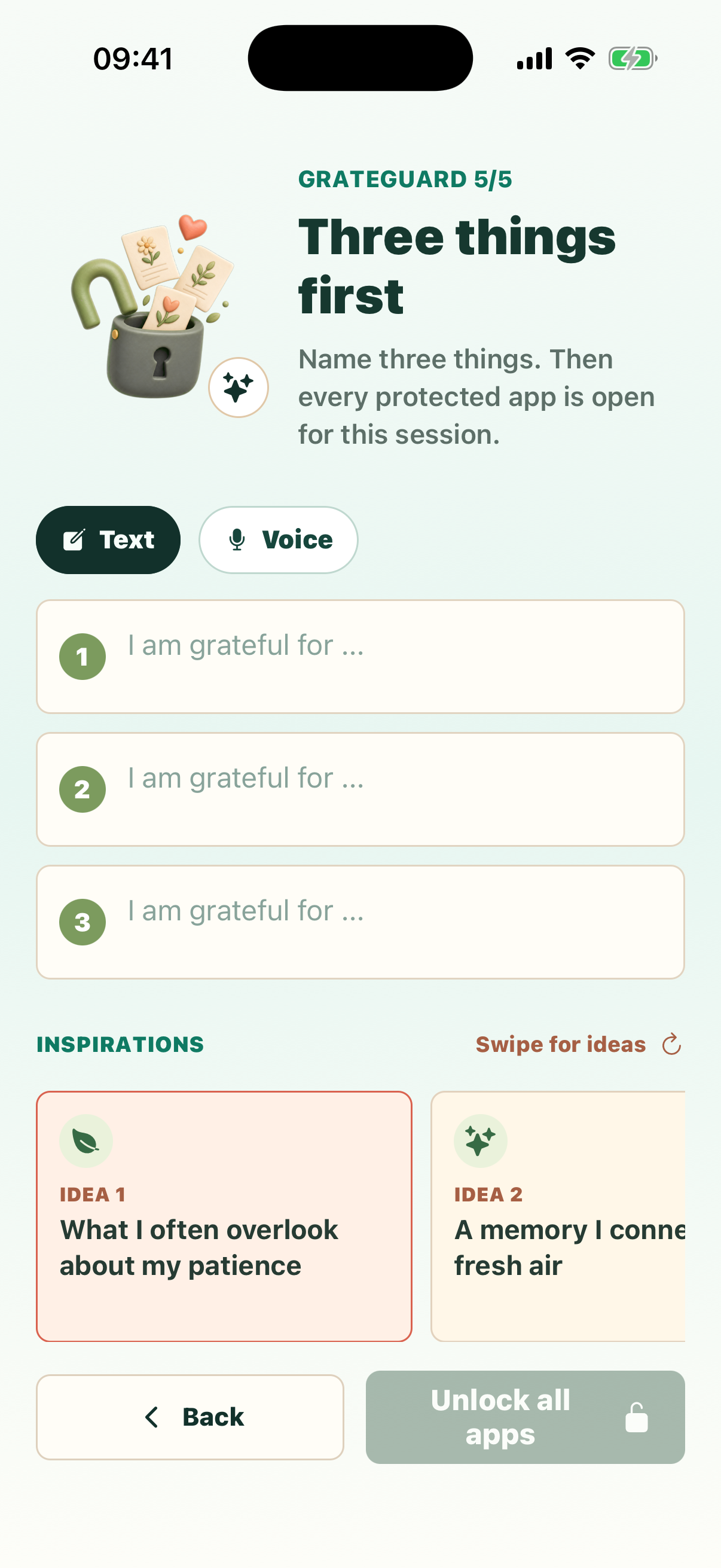
Opal is a broad focus toolkit. GrateGuard is a narrower behavior change: protect as many apps as you want, then name three gratitudes before an intentional session begins.

Official sources linked Free plans compared No one-size-fits-all winner

This page is published by GrateGuard. GrateGuard is not affiliated with, endorsed by, or sponsored by Opal. Opal is a trademark of its respective owner.

GrateGuard asking for three gratitude entries before protected apps unlock

Quick answer

Choose the intervention, not just the blocker.

Both apps add friction before distraction. They are built around different kinds of friction.

Consider GrateGuard when

You want one focused ritual and a generous free core.

Unlimited selected apps, text resets, lock hours, session duration, and seven days of local history stay free. No account is required. Optional Plus adds voice and complete local history.

Consider Opal when

You want a broader focus system across devices.

Opal documents rules, app limits, timers, soundscapes, scores, and iOS, Android, and Mac support. Its free plan currently includes one rule; Pro adds unlimited rules and harder blocking.

Side by side

GrateGuard vs Opal

Features and terms change. Check the linked official pages and current store listing for your device.

Feature comparison between GrateGuard and Opal, reviewed July 21, 2026
What to compare GrateGuard Opal
Core approach A three-entry gratitude ritual sits before protected apps. Completing it starts a temporary shared access session. Rules, focus sessions, schedules, app limits, timers, reports, and motivational tools form a broader focus system. Official Google Play listing
Free access Unlimited app selection, text resets, lock hours, session duration, and the latest seven days of local history are free. Opal lists a free-forever plan with one rule, app blocking, basic timers and soundscapes, and today’s Opal Score. Official pricing
Paid extras Optional Plus adds voice gratitude entry and complete local history. Opal Pro lists unlimited rules, harder blocking, no-unblock options, advanced timers and soundscapes, Allow Only, and score history. Official pricing
Platforms Use the App Store and Google Play buttons on this page to check current availability and compatibility for your device. Opal’s pricing page currently lists iOS, Android, and Mac. Official platform list
Accounts and data No account is required. Gratitude history and protected-app choices stay on-device; optional services are disclosed separately. GrateGuard privacy disclosure Opal says detailed app-usage data stays on-device, while its policy separately describes account, usage, diagnostics, and optional social data. Official privacy policy
Likely fit People who want a private gratitude-specific pause before selected apps. People who want wider focus tooling, stricter paid controls, and multi-platform support.

Method and sources

Checked against current first-party information.

We compared documented behavior and plan limits, not subjective performance. Opal facts come from its own website and official store listings. This review was last updated on .

Questions

Opal alternative FAQ

What is a good Opal alternative for gratitude-based app blocking?

GrateGuard is built for that specific approach. It asks for three private gratitude entries before protected apps open for a temporary session. Opal is broader, with rules, timers, app limits, reports, and focus tools.

Is GrateGuard a free alternative to Opal?

GrateGuard includes unlimited protected apps, text-based gratitude resets, custom lock hours and session duration, and the latest seven days of local history in its free core. Opal also has a free plan; its official pricing page currently lists one rule, app blocking, basic timers and today’s Opal Score.

Does Opal work on Android?

Yes. Opal’s official pricing page lists iOS, Android, and Mac, and its Android app is available on Google Play. Features can differ by platform and product version.

Which app is harder to override?

Opal lists harder blocking and no-unblock options in Pro. GrateGuard is designed as a personal behavior boundary: it places a gratitude ritual before selected apps, not a tamper-proof parental-control or device-security system.

How should I choose between GrateGuard and Opal?

Choose the loop you want to repeat. Pick GrateGuard when you want a focused gratitude ritual, a no-account setup, and unlimited free app selection. Pick Opal when broader focus rules, timers, soundscapes, reports, and multi-platform support matter more.

Try the focused alternative

Protect every distracting app. Keep the gratitude pause.

Choose your store to check current availability and start with GrateGuard’s free core.